![logo-1-1.png]](https://support.proformex.com/hs-fs/hubfs/logo-1-1.png?height=22&name=logo-1-1.png)
Why duplicates happen
When Proformex receives agent data via a data feed, it matches agents using two criteria: Agent Name AND either Agent NPN or email address. If a carrier sends only an agent name without an NPN or email, Proformex cannot definitively match that name to an existing agent record and will create a new entry. This results in two separate records for the same agent.
How to merge duplicate agents
Account Administrators can merge duplicate agent records into a single entry. Only Account Admins have access to this feature.
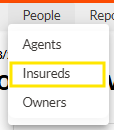
- From the top navigation, go to People and select Agents.
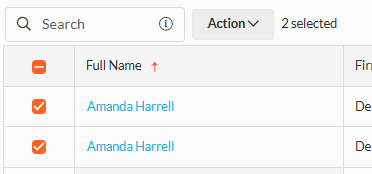
- Locate the duplicate agent entries. Use the filter or search to find them if needed.
- Check the boxes beside each duplicate name.
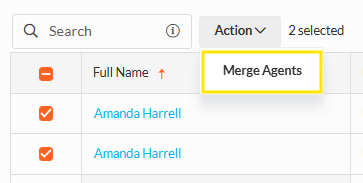
- Click the Action button at the top of the list and select Merge.
- Follow the prompts to complete the merge.
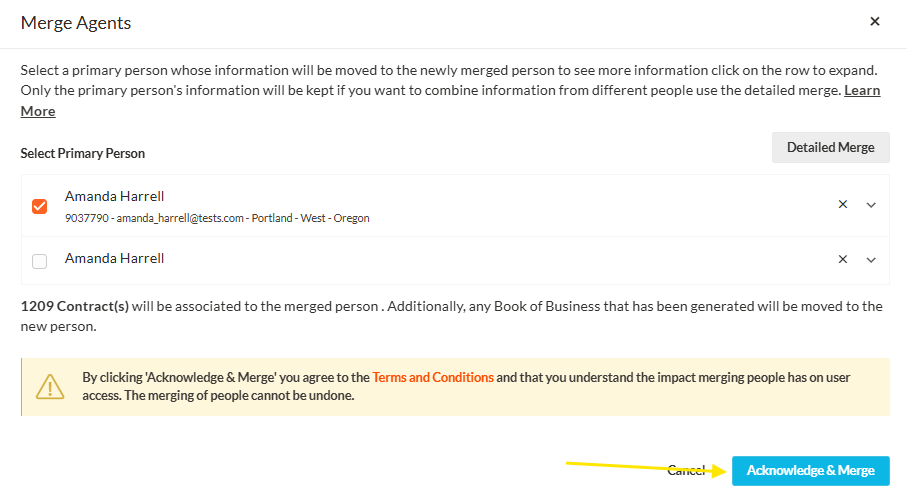
Once merged, the two entries will be consolidated into a single agent record and all associated policies and annuities will be retained.
Preventing duplicates
Duplicates typically originate from the data feed rather than manual entry. To reduce future duplicates, ensure that agent NPN or email information is included when data is submitted by the carrier. Contact your Customer Success Manager if you are seeing a high volume of duplicate agents and would like to review your data feed setup.